Vyapar invite code · Last checked 25 Sep 2026
Vyapar Referral Code: PNQ1G9
Use PNQ1G9 as your Vyapar invite code when you create a new Vyapar account. Paste it in the "Invite Code (if any)" box on the OTP screen to get 3 to 6 months extra on your plan. The code is free and takes a few seconds to add.
What is a Vyapar referral code?
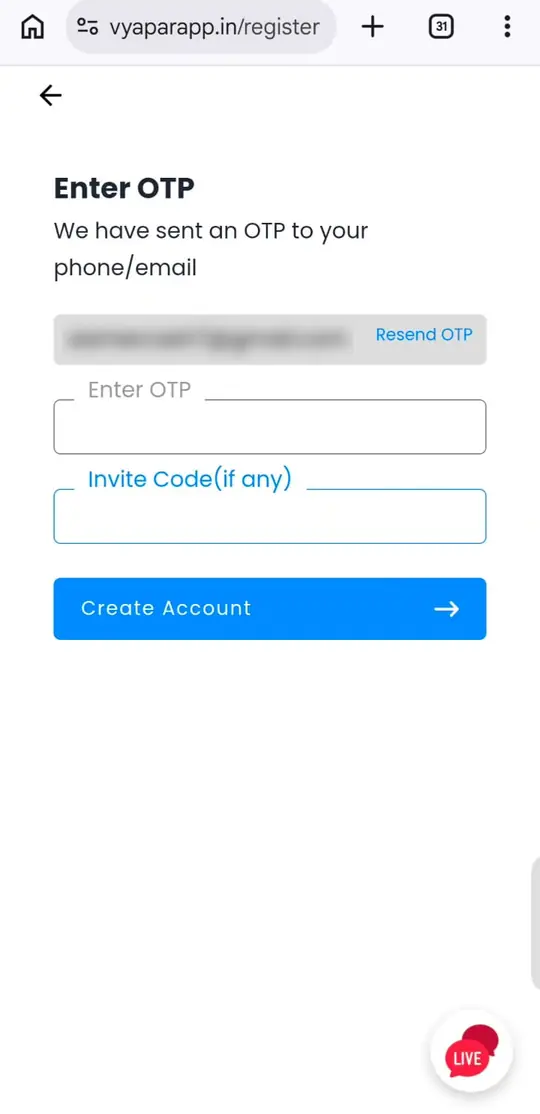
A Vyapar referral code is a short code that links your new Vyapar account to an existing user's referral. On the sign-up screen, Vyapar calls it an invite code, so the box you are looking for is labelled "Invite Code (if any)". It sits just below the OTP field.
Entering PNQ1G9 in that box gives you 3 to 6 months extra on your Vyapar plan. How many months you get depends on the plan and duration you choose, and Vyapar applies it to your account.
One thing to keep in mind: the invite code box only appears while you are creating a new account. Copy the code before you start so it is ready when you reach that screen.
Step-by-step
How to use the Vyapar invite code
Five steps on your phone or computer. Keep your mobile number or email handy for the OTP.
-
Open the sign-up screen
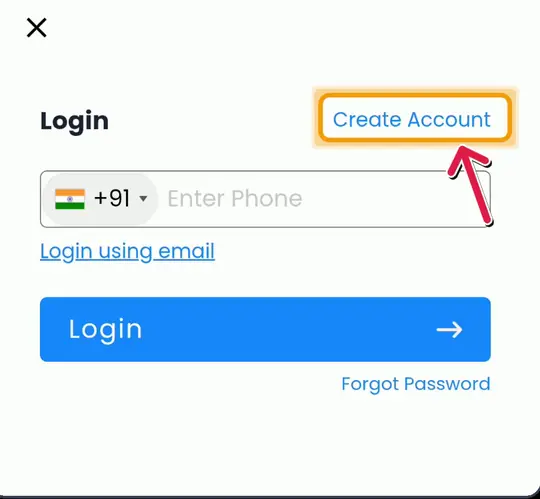
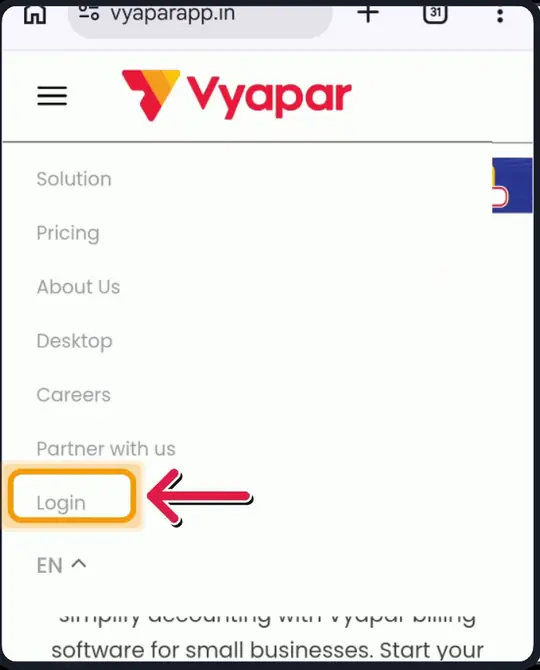
Go to vyaparapp.in. On a phone, open the menu (☰), tap Login, then tap Create Account.
 (opens larger view)
-
Enter your mobile number or email
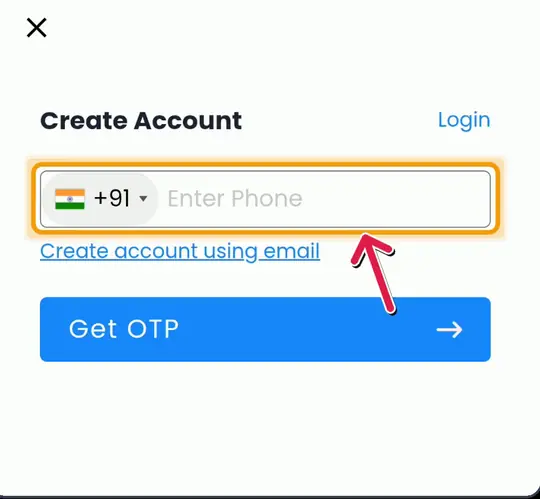
Type your mobile number, or tap "Create account using email". Then tap Get OTP.
 (opens larger view)
-
Add the OTP and invite code
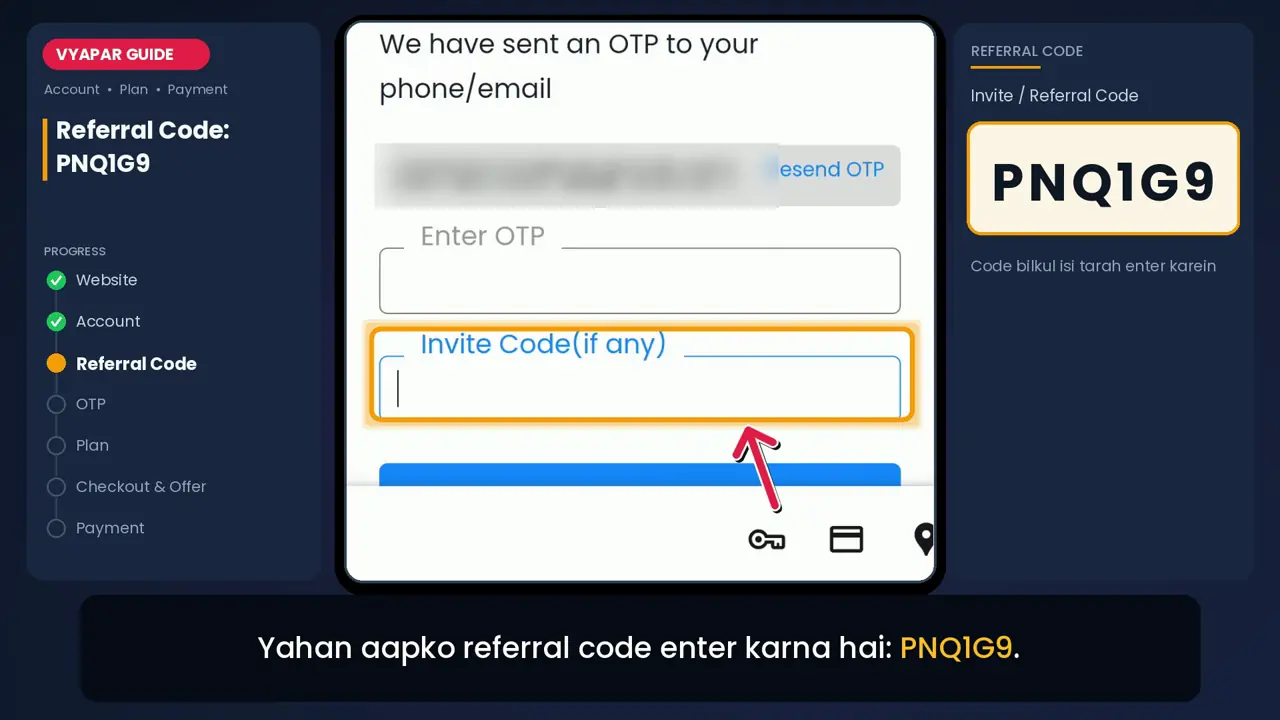
Type the OTP you received. In "Invite Code (if any)", paste PNQ1G9. Then tap Create Account.
(opens larger view) -
Choose device and duration
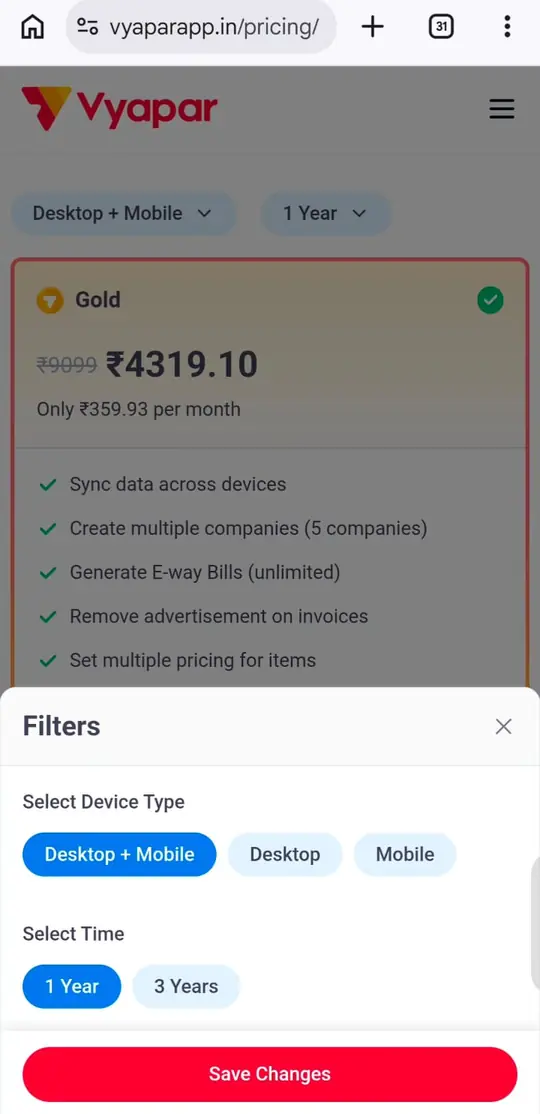
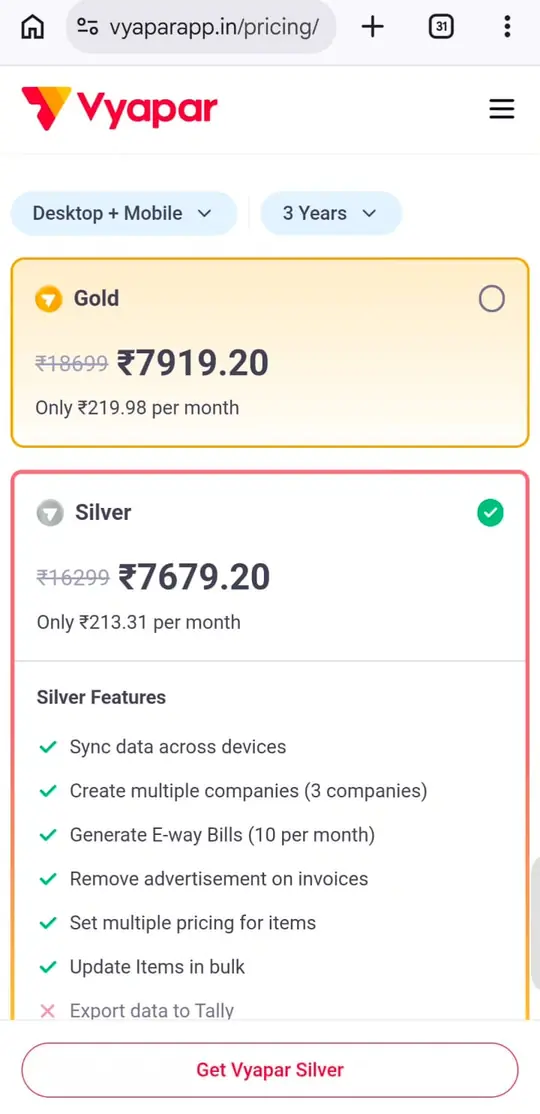
On the pricing page, use the filters to pick Mobile, Desktop or Desktop + Mobile, and 1 year or 3 years.
 (opens larger view)
-
Pick Silver or Gold and pay
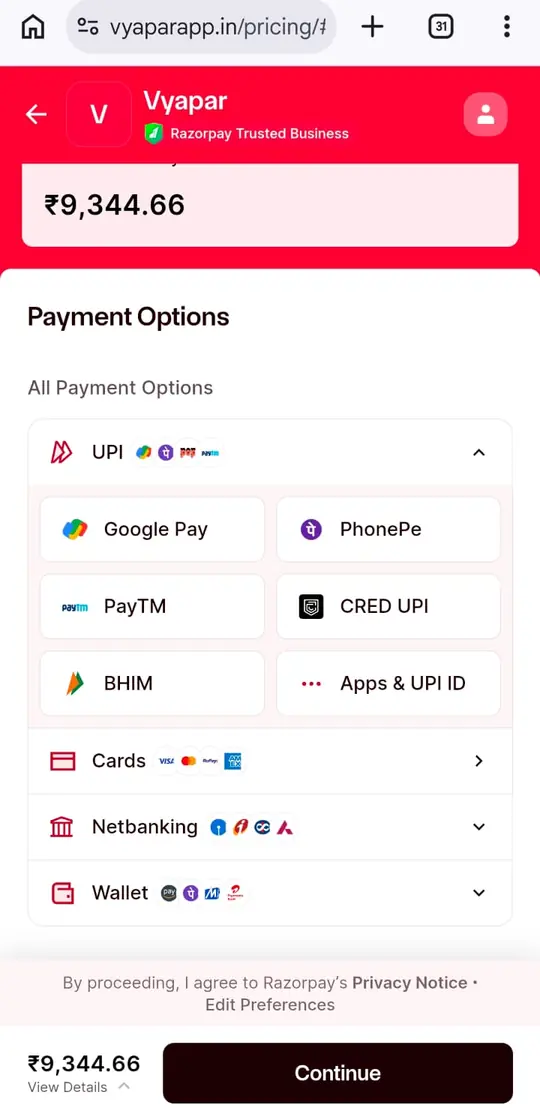
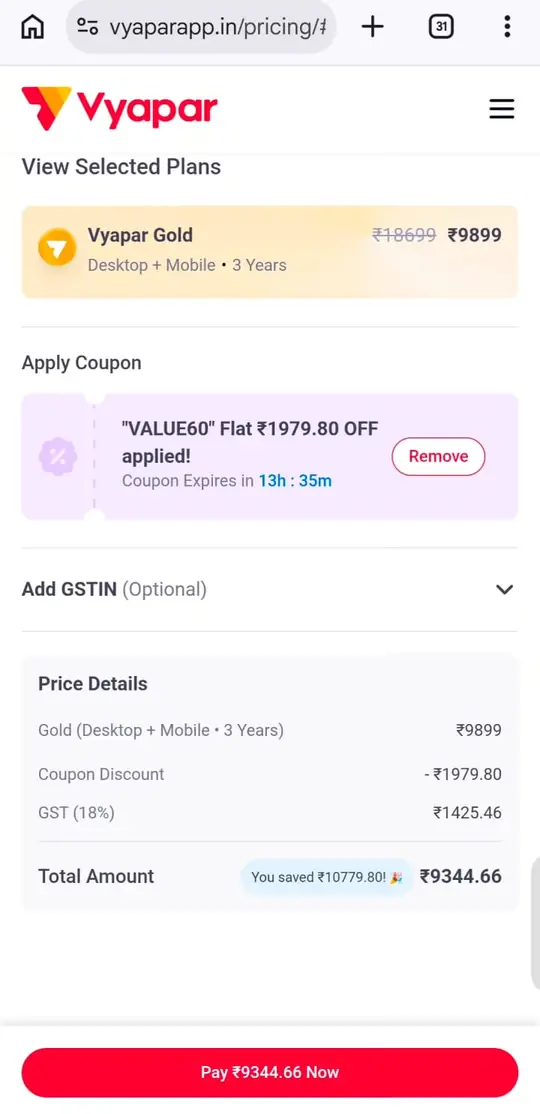
Check the price details and any coupon on the checkout page, then pay by UPI, card, net banking or wallet.
 (opens larger view)
Read the full guide to Vyapar registration with a referral code Referral code not working? See the fixes
Screenshots
Screenshot tutorial
Real screens from vyaparapp.in, in the order you will see them. Tap a screenshot to open it full size.
-
 (opens larger view)
Screen 1 · Step 1 The official website, vyaparapp.in, opened on a phone. -
 (opens larger view)
Screen 2 · Step 1 Open the menu (☰) and tap Login. (Frame from our video; the highlight is from the video.) -
(opens larger view)
Screen 3 · Step 1 In the Login box, tap Create Account at the top right. (Frame from our video.) -
(opens larger view)
Screen 4 · Step 2 Enter your mobile number, or tap "Create account using email", then tap Get OTP. (Frame from our video.) -
(opens larger view)
Screen 5 · Step 3 The OTP screen. Type the OTP and paste PNQ1G9 in "Invite Code (if any)". Our email address is blurred. -
(opens larger view)
Screen 6 · Step 4 Filters: choose Mobile, Desktop or Desktop + Mobile, then 1 Year or 3 Years, and tap Save Changes. -
 (opens larger view)
Screen 7 · Step 5 The plan cards: Gold and Silver with 3-year Desktop + Mobile prices (sale prices seen on 24 Sep 2026). -
 (opens larger view)
Screen 8 · Step 5 Checkout: plan price, coupon discount, 18% GST and the total amount. -
(opens larger view)
Screen 9 · Step 5 The Razorpay payment page: UPI, cards, net banking or wallet.
Language: Hindi · Length: about 3 minutes
Video tutorial
Watch the full sign-up in 3 minutes
A Hindi walkthrough of every screen: opening vyaparapp.in, creating the account, entering PNQ1G9 as the invite code, verifying the OTP, choosing a plan and reaching the payment page.
Jump to a step
- 0:20 Open vyaparapp.in
- 0:25 Open the menu and tap Login, then Create Account
- 0:35 Enter your mobile number or email
- 0:50 Paste the invite code PNQ1G9
- 1:15 Enter the OTP and create the account
- 1:30 Choose Mobile, Desktop or both
- 2:00 Pick 1 year or 3 years
- 2:15 Choose Gold or Silver
- 2:30 Check the coupon and the total
Why use it
What you get
The benefit of the invite code, and the main features of the Vyapar plans it applies to.
-
3 to 6 months extra
Added when you create your account with PNQ1G9. The number of months depends on the plan and duration you choose.
-
Free to use
Entering the code costs nothing. You pay only the plan price Vyapar shows at checkout.
-
Works with sale offers
The invite code goes in at sign-up. Sale coupons appear later on the checkout page, and Vyapar sometimes applies them for you.
What you get with Vyapar
-
GST billing
Create GST invoices and keep payments, inventory and accounts in one app.
-
E-way bills
Gold includes unlimited e-way bills. Silver includes 10 a month.
-
Items and pricing
Set more than one price for an item and update items in bulk, on both Silver and Gold.
-
Mobile, desktop or both
Choose the device type when you buy. Paid plans sync your data across devices.
-
More than one business
Manage up to 3 companies on Silver and up to 5 on Gold.
-
Gold extras
Tally export, an accounting module, party-wise profit and loss reports, WhatsApp Connect and unlimited restore of deleted transactions.
- Indian businesses, as stated by Vyapar
- 1.5 Cr+
- Google Play rating shown on vyaparapp.in
- 4.8 / 5
- G2 rating shown on vyaparapp.in
- 4.4 / 5
Features and figures are taken from vyaparapp.in and its pricing page, checked on 25 Sep 2026. Vyapar can change them at any time, so please confirm on the official website before you pay.
FAQ
Quick answers
What is the Vyapar referral code?
It is PNQ1G9. Vyapar calls it an invite code. Enter it once, while you create your account, to get 3 to 6 months extra on your plan.
Where do I enter the Vyapar invite code?
On the OTP screen, in the box called "Invite Code (if any)". It sits just below "Enter OTP" and above the Create Account button.
Is the referral code free?
Yes. Using PNQ1G9 costs nothing. You only pay for the plan you choose.
Can I add the code after I register?
The box only appears during sign-up, so that is the time to add it. If you have already registered, you can ask Vyapar support whether it can be added, but only Vyapar can make that change.
Why is my referral code not working?
Usually the code was mistyped, has an extra space, or the account already existed. Copy it with the Copy Code button and make sure you are creating a new account.
Is the referral code still valid?
We last checked the sign-up steps and the code on 25 Sep 2026. If anything changes, we update this page.
Which is better, Silver or Gold?
Pick Silver for up to 3 companies and 10 e-way bills a month. Pick Gold if you need 5 companies, unlimited e-way bills or Tally export.
Is this the official Vyapar website?
No. Vyapar Referral Code PNQ1G9 Get 3 to 6 Month Extra Subscription is run by Husaini Aamer, an authorised Vyapar partner. It is not Vyapar's official website: Vyapar handles all accounts, plans and payments. The official website is vyaparapp.in.
Contact
Still have a question?
Stuck on a step, or not sure which plan fits your business? Ask us. We usually reply within 24 hours.
Ready to start with Vyapar?
Copy PNQ1G9, create your Vyapar account and get 3 to 6 months extra on your plan.
Get Vyapar